Relay Server & Gateway Integration
This page covers building the Node.js Express server that acts as the bridge between the Africa's Talking USSD gateway and the InclusiveDeFi contract on RSK Testnet. It also covers registering your USSD callback with Africa's Talking and exposing your local server to the internet using ngrok.
How the Relay Server Works
The relay server is a stateless HTTP server with a single POST /ussd endpoint. Every time a user presses a key on their feature phone, Africa's Talking sends an HTTP POST to this endpoint. The server reads the accumulated session input from the text field, determines what the user wants, calls the appropriate contract function, and returns a CON (continue) or END (terminate) response string.
There is no database, no session store, and no authentication layer in this proof of concept. The entire session state is encoded in the text field of the incoming request.
Creating the Relay Server
Create index.ts in your project root:
import express, { Request, Response } from 'express';
import { ethers } from 'ethers';
import * as dotenv from 'dotenv';

dotenv.config();

const app = express();
app.use(express.urlencoded({ extended: false }));

/* -------------------------------------------------------------------------- */
/*                           PROVIDER + RELAYER WALLET                        */
/* -------------------------------------------------------------------------- */

const provider = new ethers.JsonRpcProvider(process.env.RSK_TESTNET_RPC);
const wallet = new ethers.Wallet(process.env.PRIVATE_KEY as string, provider);

const CONTRACT_ADDRESS = "YOUR_DEPLOYED_CONTRACT_ADDRESS";

const ABI = [
  "function getBalance(address user) view returns (uint256)",
  "function transfer(address to, uint256 amount)",
  "function applyForLoan()"
];

const contract = new ethers.Contract(CONTRACT_ADDRESS, ABI, wallet);

/* -------------------------------------------------------------------------- */
/*                    SESSION GUARD (PREVENTS DUPLICATE TXs)                  */
/* -------------------------------------------------------------------------- */

const processedSessions = new Set<string>();

// Auto-cleanup sessions after 5 minutes to prevent memory leak
function addSession(sessionId: string) {
  processedSessions.add(sessionId);
  setTimeout(() => processedSessions.delete(sessionId), 5 * 60 * 1000);
}

/* -------------------------------------------------------------------------- */
/*                                DEBUG LOGGER                                */
/* -------------------------------------------------------------------------- */

app.use((req, _res, next) => {
  console.log("USSD HIT");
  console.log("BODY:", req.body);
  next();
});

/* -------------------------------------------------------------------------- */
/*                                  USSD ROUTE                                */
/* -------------------------------------------------------------------------- */

app.post('/ussd', async (req: Request, res: Response) => {
  const { text, phoneNumber, sessionId } = req.body;
  const input = text ? text.split('*') : [''];
  let response = "";

  // Helper to send response
  const send = (msg: string) => {
    res.header('Content-Type', 'text/plain');
    res.send(msg);
  };

  try {

    /* ------------------------------ MAIN MENU ------------------------------ */
    if (text === "") {
      response = `CON Rootstock DeFi (${phoneNumber})
1. My Balance
2. Send Money (P2P)
3. Request Micro-Loan`;
      return send(response);
    }

    /* ---------------------------- BALANCE CHECK ---------------------------- */
    else if (input[0] === "1") {
      try {
        const bal = await contract.getBalance(wallet.address);
        response = `END Your Balance: ${ethers.formatEther(bal)} tRBTC`;
      } catch (err) {
        console.error("Balance fetch error:", err);
        response = "END Failed to fetch balance. Try again.";
      }
      return send(response);
    }

    /* ------------------------------ SEND MONEY ----------------------------- */
    else if (input[0] === "2") {

      // Step 1: Ask for recipient address
      if (!input[1]) {
        response = "CON Enter Recipient Address:";
        return send(response);
      }

      // Step 2: Ask for amount
      else if (!input[2]) {
        response = "CON Enter Amount (in tRBTC):";
        return send(response);
      }

      // Step 3: Execute transfer
      else {
        const sessionKey = `transfer_${sessionId}`;

        // Prevent duplicate transfer
        if (processedSessions.has(sessionKey)) {
          response = "END Transfer already submitted. Please wait for confirmation.";
          return send(response);
        }

        addSession(sessionKey);

        try {
          const to = input[1].trim();
          const amount = ethers.parseEther(input[2].trim());

          console.log(`Sending ${input[2]} tRBTC to ${to}...`);

          // Submit tx — DO NOT await tx.wait() (too slow for USSD timeout)
          const tx = await contract.transfer(to, amount);

          // Confirm in background
          tx.wait()
            .then(() => console.log(`Transfer confirmed: ${tx.hash}`))
            .catch((err: any) => console.error(`Transfer failed on-chain: ${err.reason || err.message}`));

          response = `END Transfer Submitted
To: ${to.substring(0, 10)}...
Tx: ${tx.hash.substring(0, 12)}...
Funds will arrive shortly.`;

        } catch (err: any) {
          processedSessions.delete(`transfer_${sessionId}`);
          console.error("Transfer error:", err);

          if (err.reason?.includes("Insufficient balance")) {
            response = "END Insufficient balance for transfer.";
          } else if (err.reason) {
            response = `END Transfer failed: ${err.reason}`;
          } else {
            response = "END Transfer failed. Check address and balance.";
          }
        }

        return send(response);
      }
    }

    /* ---------------------------- REQUEST LOAN ----------------------------- */
    else if (input[0] === "3") {
      const sessionKey = `loan_${sessionId}`;

      // Prevent duplicate loan tx
      if (processedSessions.has(sessionKey)) {
        response = "END Loan already submitted. Please wait for confirmation.";
        return send(response);
      }

      addSession(sessionKey);

      try {
        console.log("Applying for loan...");

        // Submit tx — DO NOT await tx.wait() (too slow for USSD timeout)
        const tx = await contract.applyForLoan();

        // Confirm in background
        tx.wait()
          .then(() => console.log(`Loan confirmed: ${tx.hash}`))
          .catch((err: any) => console.error(`Loan failed on-chain: ${err.reason || err.message}`));

        response = `END Loan Requested
Tx: ${tx.hash.substring(0, 12)}...
0.01 tRBTC credited shortly.`;

      } catch (err: any) {
        processedSessions.delete(sessionKey);
        console.error("Loan error:", err);

        if (err.reason?.includes("Existing loan active")) {
          response = "END You already have an active loan.";
        } else if (err.reason) {
          response = `END Loan failed: ${err.reason}`;
        } else {
          response = "END Loan request failed. Try again.";
        }
      }

      return send(response);
    }
    else {
      response = "END Invalid choice. Please try again.";
      return send(response);
    }

  } catch (error) {
    console.error("USSD FATAL ERROR:", error);
    response = "END Something went wrong. Please try again.";
    return send(response);
  }
});

/* -------------------------------------------------------------------------- */
/*                                  SERVER                                    */
/* -------------------------------------------------------------------------- */

app.listen(3000, () => {
  console.log("RSK-USSD Bridge running on port 3000");
});
Understanding the USSD State Machine
The text field from Africa's Talking accumulates all user inputs for the session, joined by *. The relay server splits on * and uses array index to determine the current menu depth:
text value | input array | State | Action |
|---|---|---|---|
"" | [""] | Entry | Show main menu |
"1" | ["1"] | Balance selected | Call getBalance(), end session |
"2" | ["2"] | Transfer selected | Prompt for recipient |
"2*0xABC" | ["2", "0xABC"] | Recipient entered | Prompt for amount |
"2*0xABC*0.005" | ["2", "0xABC", "0.005"] | Amount entered | Execute transfer, end session |
"3" | ["3"] | Loan selected | Call applyForLoan(), end session |
This table driven pattern is the canonical way to implement multi-depth USSD menus without any server side session storage.
Running the Server
Start the relay server with:
npm run start-bridge
You should see:
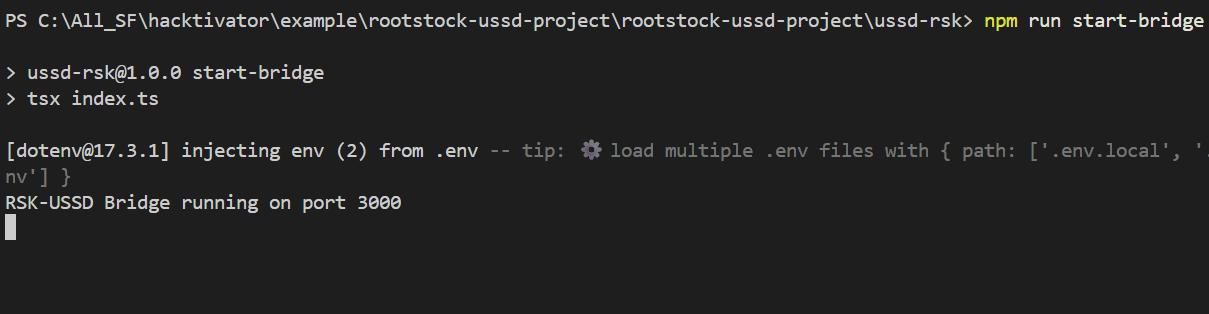
The server is now listening on http://localhost:3000/ussd. Africa's Talking requires a publicly reachable HTTPS URL to send USSD callbacks. During local development, use ngrok to tunnel your local port to the internet.
Exposing the Server with ngrok
Install ngrok from ngrok.com and run:
ngrok http 3000
ngrok will output a forwarding URL like:
Forwarding https://abc123.ngrok-free.app → http://localhost:3000
Copy the https:// URL you will register this as your USSD callback in the next step. Note that on the ngrok free tier, this URL changes every time you restart ngrok.
Registering with Africa's Talking
Creating a Sandbox Account
- Sign up at Africa's Talking and navigate to the Sandbox environment from the top navigation bar.
- In the sandbox, create a new application or use the default one provided.
Setting Up the USSD Channel
- In your Africa's Talking dashboard, go to USSD in the left sidebar.
- Click Create Channel.
- Set a shortcode — for sandbox use any value like
*384#. - Set the Callback URL to your ngrok HTTPS URL with the path:
https://abc123.ngrok-free.app/ussd - Set the HTTP Method to
POST. - Save the channel.
Configuring the Simulator
Africa's Talking provides a built-in USSD Simulator in the sandbox dashboard. You do not need a physical phone to test.
To use it:
- Go to USSD → Simulator in your dashboard.
- Enter a phone number (any format, e.g.,
+2348012345678). - Dial your shortcode (e.g.,
*384#). - The simulator will fire HTTP POSTs to your callback URL and display the USSD responses in real time.
Keep your ngrok tunnel and relay server running in separate terminal windows while testing. ngrok's web interface at http://localhost:4040 lets you inspect every incoming HTTP request and response in real time use this to debug USSD payloads.
What Each Transaction Looks Like On-Chain
When the relay server calls a write function (transfer or applyForLoan), ethers.js:
- Encodes the function call using the ABI.
- Estimates gas using the RSK node's
eth_estimateGasRPC method. - Signs the transaction with the relayer wallet's private key.
- Broadcasts it via
eth_sendRawTransactionto the RSK public node. - Polls for a receipt using
eth_getTransactionReceiptuntil the block is confirmed.
The await tx.wait() call blocks until the transaction is included in a block. RSK's average block time on testnet is approximately 30 seconds. This means write operations will have a noticeable delay before the USSD session returns. Africa's Talking's default session timeout is 180 seconds, which is sufficient for most cases, but monitor this carefully under real network conditions.
Next Steps
With the relay server running and connected to the Africa's Talking gateway, proceed to Demo & Testing to validate the full USSD flow end-to-end, run curl-based tests, and verify transactions on the RSK Testnet Explorer.